How to set up your camera for optimal capture
To get the most out of Swing Tune-Up, precision is everything. Our suite of setup tools ensures your camera is perfectly positioned, allowing the swing analyzer to deliver the most accurate data possible.
Follow these steps to dial in your setup.
1. Physical Camera Placement
Before diving into the digital tools, ensure your tripod or mount is positioned correctly:
Distance: Position the camera far enough away to capture your entire body and the full arc of the club comfortably in the center of the frame.
Height: Set the camera at hip or wrist height (relative to your position at address).
The "Square" Rule: Ensure you are perfectly square to the target—either Face-On or Down-the-Line (DTL). This eliminates parallax error and keeps your swing data honest.
2. Using the On-Screen Alignment Tools
Once your camera is physically in place, use the capture view indicators to fine-tune the angle. Think of this as your pre-shot routine for data accuracy.
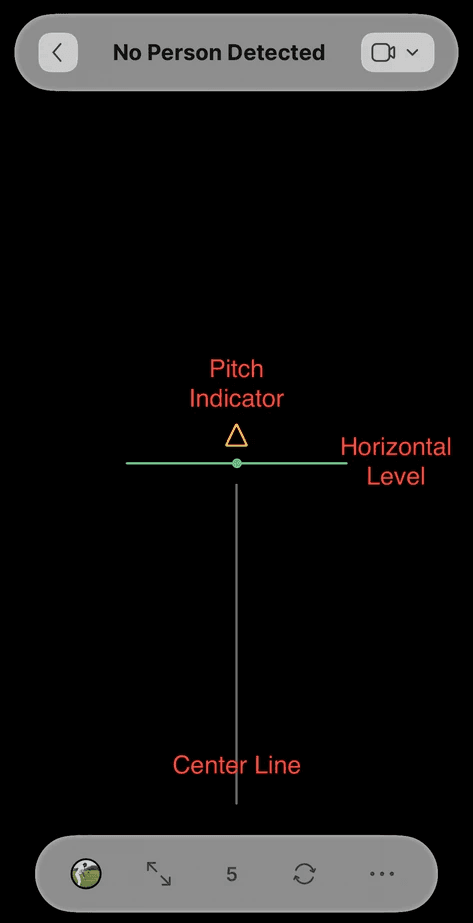
Pitch Indicator
Look for the up/down arrows on your screen. These guide the vertical tilt of your device.
Action: Tilt the camera up or down until the arrows disappear, indicating a zero-degree pitch angle.
Horizontal Level
Accuracy suffers if your camera is tilted sideways.
Action: Adjust the "roll" (side-to-side tilt) of your device until the level turns into a solid green line.
Center Line
This helps the analyzer "track" the most important planes of your swing:
For DTL (Down-the-Line): Align this line directly with your target line (the path from the ball to your target).
For Face-On: Position this line so it runs through the center of your body at address.
Pro Tip: A stable tripod is your best friend. Even a slight wobble can throw off high-speed swing metrics, so make sure everything is locked down before you start swinging!